
Human-Machine Interfaces(HMIs)-GOT GOT2000 Series

GOT Drive Control (Servo) Interactive Solutions
Support debug of motion SFC programs
R motion SFC monitor function/Q motion SFC monitor function


Having problems?
How can I check motion SFC programs without a personal computer?
GOT will solve your problems!
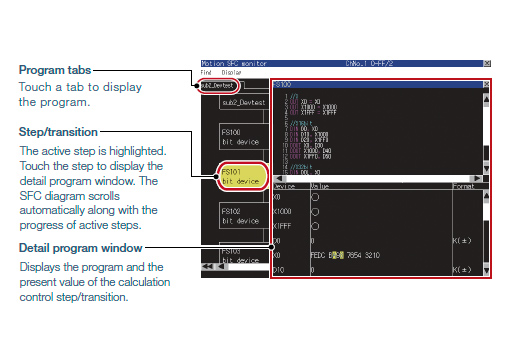
GOT can monitor motion SFC programs in the Motion CPU (MELSEC iQ-R Series, MELSEC Q Series) and display them in the SFC diagram format.
Function features
GOT can be used to monitor motion SFC programs and device values of a Motion CPU (MELSEC iQ-R Series, MELSEC Q Series) which is connected to the GOT.
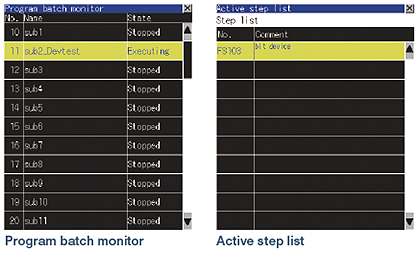
Viewing the program batch monitor or active step list enables you to check the complete status at a glance.
Specification details and restrictions
*For the necessary option devices, please refer to the “Function list”
●Target models
Motion CPU (MELSEC iQ-R Series*1、Q Series*2*3)
- *1The R motion SFC monitor function can be used when the following conditions are satisfied.
OS software package: SW10DNC-RMTFW
OS type: standard function OS or G-code controlled add-on library
To use G-code control, the G-code add-on library (paid) must be installed. - *2Use the following production number Motion CPU when using the Q172CPU or Q173CPU.
• Bus connection, direct CPU connection
Q172CPU: production number K******* or later Q173CPU: production number J******* or later
• Other than bus connection, direct CPU connection
Q172CPU: production number N******* or later Q173CPU: production number M******* or later - *3Operating system software packages for Motion CPU (Q Series) should be SV13 or SV22.
Use a Motion CPU with the following OS installed when using the Q172CPU, Q173CPU, Q172CPUN, or Q173CPUN.
• SW6RN-SV13Q□: 00H or later (00E or later for using the Q172CPU or Q173CPU with the bus connection or direct CPU connection)
• SW6RN-SV22Q□: 00H or later (00E or later for using the Q172CPU or Q173CPU in the bus connection or direct CPU connection)
*Production of Q172CPU, Q173CPU, Q172CPUN, and Q173CPUN has been discontinued.
●Supported connection types*1
Ethernet connection*2, direct CPU connection, serial communication connection, CC-Link IE Controller Network connection, CC-Link IE Field Network connection, CC-Link IE TSN connection, CC-Link connection, bus connection, MELSECNET connection
- *1For details on the connectable models for each connection type, please refer to the "Connectable model list" in the
- *2When the CC-Link IE Field Network Ethernet adapter module is used, the motion SFC monitor function cannot be used.