
Human-Machine Interfaces(HMIs)-GOT GOT2000 Series

Video Interactive Solutions
Monitor shop floor using video images
Camera link application


Having problems?
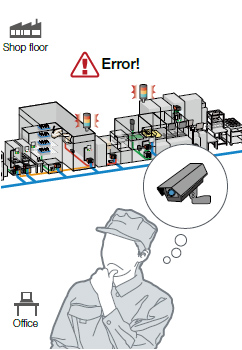
The line has stopped. How can I check the camera image before and after the error occurrence?
GOT will solve your problems!
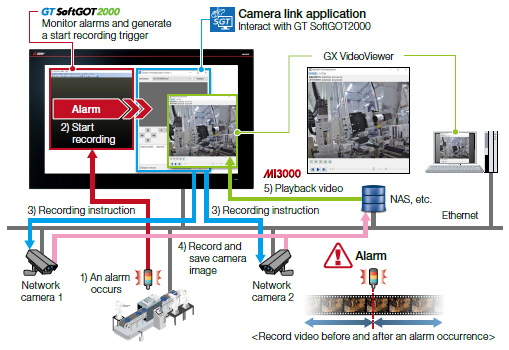
By using the camera link application and GX VideoViewer, the shop floor can be checked with video.
Function features
Images from network cameras can be recorded before and after an alarm occurrence by using the alarm of an onsite equipment as a trigger.
If multiple alarms occurred simultaneously, camera images of multiple alarms can be recorded all at once.
Since the destination to record camera images can be set to a network storage such as a personal computer or NAS, the recorded files can be viewed at a time.
System configuration example
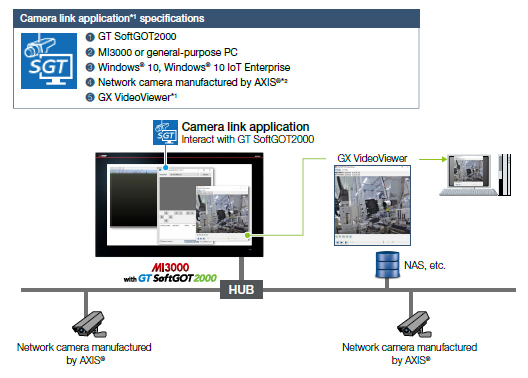
- *1For the details of camera link application and GX VideoViewer, please contact your local sales office.
- *2Usable network cameras are the same as those for the camera recording package. For the details, please refer to the Technical Bulletin
| Related materials | ||
|---|---|---|
|
|
GOT2000 Series/MELIPC MI3000 Maintenance Solutions & Video Solutions < Contents > •System-wide recording of production at a problem occurrence •Simplified analysis using data, waveform, and video feeds •Support visualization with various video solutions |
Created :
Size :
(PDF)
|
Specification details and restrictions
●Supported connection types
Ethernet
Recommended industries
Automotive
SEMICON, LCD
Electronics
F & B
Pharma
Plant
Supported GOT types
GT27
GT25
GT23
GT21
GS21
SoftGOT
Supported devices
PLC
Servo
Inverter
Robot
CNC