
Simulation tools MELSOFT Mirror

MELSOFT Mirror
MELSOFT Mirror is software that can perform simulation of the entire control system at the production site.
By connecting to engineering software (GX Works3), SCADA (GENESIS™), or user’s original software, the behavior of production lines and machinery can be validated without actual devices. It can achieve front-loading of development processes thus accelerating development speed.

Use cases
Issue 1
When performing desktop verification
It takes time and effort to modify programs to debug the system without the actual equipment.
Program modifications can affect scan time, and there is a risk of forgetting to delete them.

can achieve high-accuracy simulation with minimal effort. MELSOFT Mirror can be used to set-up a debugging environment without modifying the verification target program.

Issue 2
When preparing for desktop verification
You want to debug a system that includes multiple programmable controllers.
Preparing a debugging environment by gathering actual devices is time-consuming.
can simulate the entire system without actual devices.
It is possible to set-up systems including networks within a virtual environment.
Before setting up any actual machines, it is possible to verify control programs without using any actual machines or setting up any hardware.

Issue 3
Operation verification
Mechanical checks and programmable controller program debugging are performed separately, which can result in on-site machine failures and rework.
The more complex and faster the equipment, the greater the risk of problems; existing simulators may not provide sufficient verification.
can accurately debug programs and equipment by time-synchronizing with an external tool.
By synchronizing with 3D simulator MELSOFT Gemini, it is possible to manipulate devices in 3D space via the simulation of I/O and Simple Motion modules.
It is possible to achieve a debugging environment that’s closer to on-site conditions by providing the control program with feedback that accounts for the physical position of components and operational parameters of machines.

Issue 4
Collaborative work
When multiple people work on a project and a failure occurs, explaining how to reproduce the failure and setting up/debugging large systems in multiple parts is time-consuming.
Localized simulations limit effective data sharing and collaborative work.
It is also difficult to verify logic that depends on other nodes due to limitations in simulation scale.
allows multiple people to access the same debug environment concurrently.
With one instance of MELSOFT Mirror, multiple people regardless of their location can simultaneously access the simulation and take part in debugging.
By accessing the same debugging environment, it is easier to debug collaboratively and to share information, improving debugging efficiency, overall quality of the system, and shrinking lead times.

Benefits
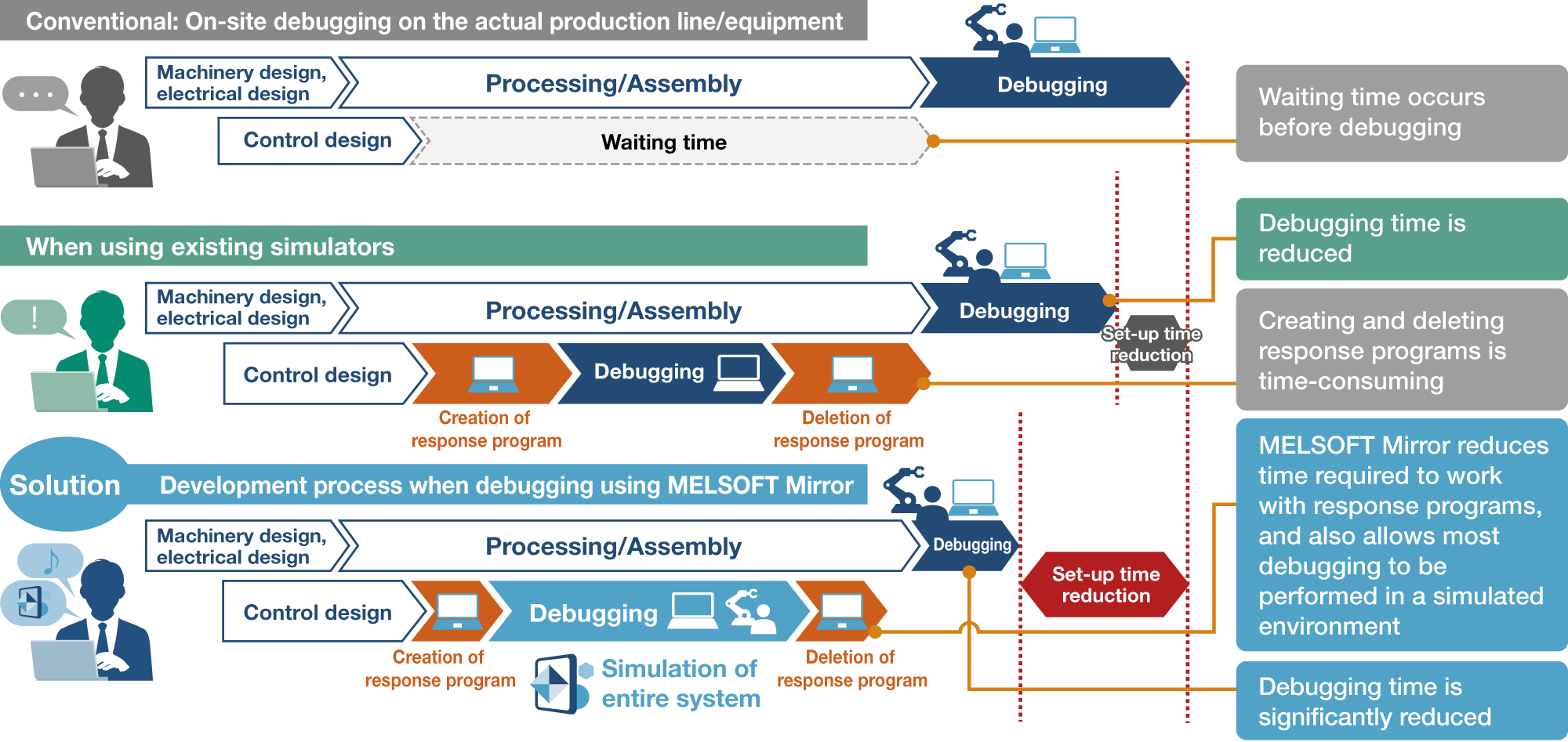

-
Response program: It is prepared to simulate the responses of external devices and networks.
For software-based validation, it is necessary to edit the control program used in the actual machines, which means creating and deleting response programs.

MELSOFT Mirror can resolve issues during desktop verification early,
enabling the development process to be front-loaded and reducing the overall lead time.
Features
Intuitive operation for smooth simulation and device visualization
From opening a browser to monitoring in GX Works3, the setup steps are shown in video guides.
-
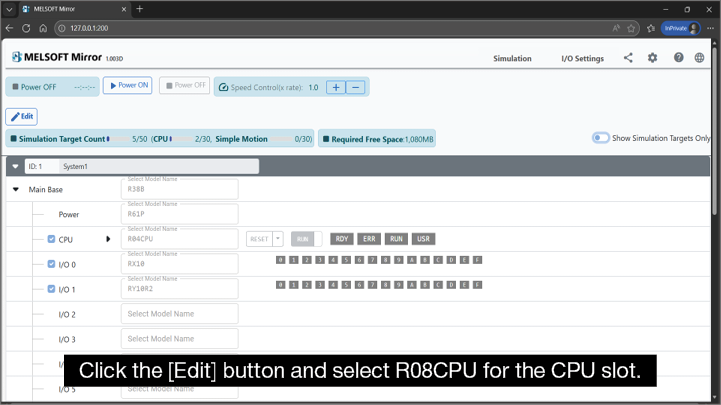
Setting system
configurationOpen the MELSOFT Mirror hardware configuration window in a browser and select the programmable controller model from a dropdown list.
-
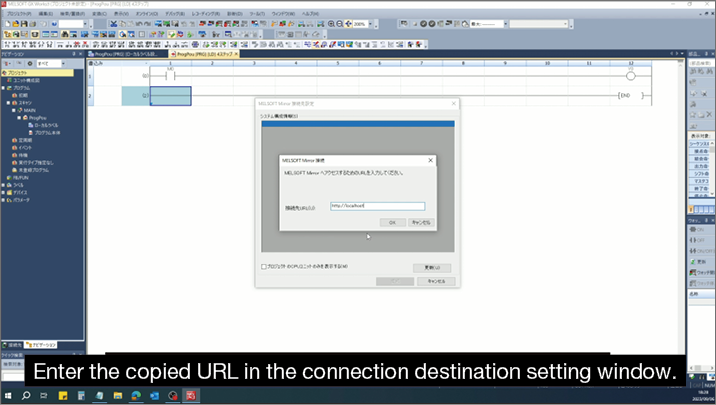
Connecting GX Works3
to MELSOFT MirrorCopy and paste the URL of MELSOFT Mirror in the connection destination setting window of GX Works3.
-
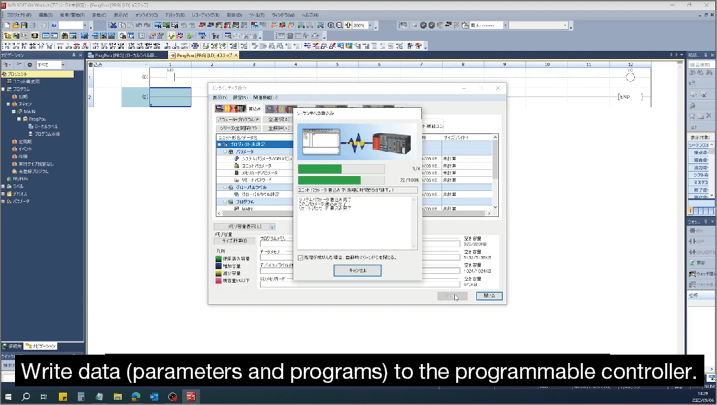
Reading, writing,
and monitoring control programsConnect GX Works3 to MELSOFT Mirror in the same way you connect GX Works3 to a physical programmable controller, and read, write, and monitor control programs on MELSOFT Mirror.
Benefits of MELSOFT Mirror!
Simulation speed control
You can change the simulation speed of the control program running in the virtual environment, achieving efficient desktop verification.
Fast-forward(×4, ×2)
Shortens the time until verification starts by fast-forwarding to a specific point.
Slow-motion(×1/2, ×1/4)
Enables detailed observation of data and control operation.
Multilingual support
The display language can be switched via the menu (Japanese/English/Chinese (Simplified)).
Connect external simulators or applications to debug in an environment similar to on-site environments

Debug both the control programs as well as other parts of the system (e.g. GOT, SCADA) without actual Programmable controllers and devices, as a complete system in an environment similar to on-site conditions.
Additionally, improve debugging efficiency by connecting to data collection software.

Synergies of MELSOFT Gemini and MELSOFT Mirror

Visualize equipment operation by using MELSOFT Mirror and a 3D simulator together
Link MELSOFT Mirror with a 3D simulator to visualize control-program execution in 3D and verify the operation of the entire production line and equipment.
Mechanical interference and collisions that are difficult to detect with just a logic simulator can be identified, helping to further reduce on-site adjustment work during commissioning.
