
Human-Machine Interfaces(HMIs)-GOT GOT2000 Series

GOT Drive Control (Inverter) Interactive Solutions
GOT Drive Control (Inverter) Interactive Solutions
Challenges that cannot be resolved just with the inverter can now be
resolved with GOT2000 and inverter interactive functions.
The GOT2000 provides advanced functionality and improves connectivity with Mitsubishi Electric inverter systems. It provides some functions of FR Configurator2. The GOT Drive enhanced functionality is designed to eliminate need for additional hardware, software and suits customer's applications to realize central monitoring, speed up system startup, improve predictive maintenance and troubleshooting.
Drive control interactive functions and supported inverter models (GT Works3 Ver.1.270G)
See details of supported models and versions
○: Supported ×: Not supported △: Only monitorable parameters are supported −: Not applicable ●: Sample screen available
| Function | CASE1 | CASE2 | CASE3 | CASE4 | CASE5 | FR-A800 Plus Series | ||||||||||||||||||||||
|---|---|---|---|---|---|---|---|---|---|---|---|---|---|---|---|---|---|---|---|---|---|---|---|---|---|---|---|---|
| CASE1 | CASE2 | CASE4 | CASE5 | |||||||||||||||||||||||||
| Ethernet connection | CC-Link IE Field Network connection via programmable controller |
CC-Link IE TSN connection via programmable controller |
Ethernet connection via programmable controller |
RS-485 connection | Ethernet connection | CC-Link IE Field Network connection via programmable controller |
Ethernet connection via programmable controller |
RS-485 connection | ||||||||||||||||||||
| FR-A800-E/ FR-F800-E/ FR-E800-E |
FR-E700-NE | FR-A800-GF/ FR-A800+FR-A8NCE/ FR-F800+FR-A8NCE |
FR-E800-E | FR-A800-GN/ FR-A800+FR-A8NCG/ FR-F800+FR-A8NCG |
FR-A800-E/ FR-F800-E/ FR-E800-E |
FR-E700-NE | FR-A800/ FR-F800 |
FR-E800 | FR-E700/ FR-D700 |
FR-A800-E-CRN/ FR-A800-E-R2R/ FR-A800-E-AWH/ FR-A800-E-LC |
FR-A800-CRN +FR-A8NCE/ FR-A800-R2R +FR-A8NCE/ FR-A800-LC +FR-A8NCE |
FR-A800-E-CRN/ FR-A800-E-R2R/ FR-A800-E-AWH/ FR-A800-E-LC |
FR-A800-CRN/ FR-A800-R2R/ FR-A800-AWH/ FR-A800-LC |
|||||||||||||||
| Function available |
Sample screen*1*3 |
Function available |
Sample screen*1*3 |
Function available |
Sample screen*1*3 |
Function available |
Sample screen*1*3 |
Function available |
Sample screen*1*3 |
Function available |
Sample screen*1*3 |
Function available |
Sample screen*1*3 |
Function available |
Sample screen*1*3*6 |
Function available |
Sample screen*1*3 |
Function available |
Sample screen*1*3*6 |
Function available |
Sample screen*1*3 |
Function available |
Sample screen*1*3 |
Function available |
Sample screen*1*3 |
Function available |
Sample screen*1*3 |
|
| Parameter setting (simple mode) |
○ | ● | ○ | × | ○ | ●*2 | ○ | ●*2 | ○ | × | ○ | ●*2 | ○ | × | ○ | ● | ○ | ●*2 | ○ | ● | ○ | × | ○ | × | ○ | × | ○ | × |
| Parameter recipe (simple backup/restoration) |
○ | ● | ○ | × | ○ | ●*2 | ○ | ●*2 | ○ | × | ○ | ●*2 | ○ | × | ○ | × | ○ | ●*2 | ○ | × | ○ | × | ○ | × | ○ | × | ○ | × |
| FA transparent*7 | ○ | − | ○ | − | ○*4 | − | × | − | × | − | ○*4 | − | ○*4 | − | ○*4 | − | ○*4 | − | ○*4 | − | ○*8 | − | ○*4 | − | ○*4*8 | − | ○*4*8 | − |
| Batch monitor | ○ | ● | ○ | × | ○ | ●*2 | ○ | ●*2 | ○ | × | ○ | ●*2 | ○ | × | ○ | ● | ○ | ●*2 | △ | ● | ○ | × | ○ | × | ○ | × | ○ | × |
| Operation command | ○ | ● | ○ | × | ○*5 | ●*2*5 | ○*5 | ●*2*5 | ○*5 | × | ○ | ●*2 | ○ | × | ○ | ● | ○ | ●*2 | ○ | ● | ○ | × | ○*5 | × | ○ | × | ○ | × |
| Machine diagnosis(load characteristics measurement) | ○ | ● | × | × | ○*5 | ●*2*5 | ○*5 | ●*2*5 | ○*5 | × | ○ | ●*2 | × | × | ○ | × | ○ | ●*2 | × | × | ○ | × | ○*5 | × | ○ | × | ○ | × |
| Inverter life diagnosis | ○ | ● | ○ | × | ○ | ●*2 | ○ | ●*2 | ○ | × | ○ | ●*2 | ○ | × | ○ | ● | ○ | ●*2 | △ | ● | ○ | × | ○ | × | ○ | × | ○ | × |
| Backup/restoration | × | − | × | − | ○ | − | × | − | × | − | × | − | × | − | × | − | × | − | × | − | × | − | × | − | × | − | × | − |
| Alarm display | ○ | ● | ○ | × | ○ | ●*2 | ○ | ●*2 | ○ | × | ○ | ●*2 | ○ | × | ○ | ● | ○ | ●*2 | △ | ● | ○ | × | ○ | × | ○ | × | ○ | × |
| Document display | ○ | ● | ○ | × | ○ | ●*2 | ○ | ●*2 | ○ | × | ○ | ●*2 | ○ | × | ○ | ● | ○ | ●*2 | ○ | ● | ○ | × | ○ | × | ○ | × | ○ | × |
- *1The sample screen is the project data that is included in GT Works3 (Ver.1.235V or later). Sample screens are not supported by GT23, GT21, GS21, and GT SoftGOT2000.
- *2The sample screen for CASE 1 can be used by changing the controller setting into the one for the system configuration to be used.
- *3If the sample screen of the required inverter is not available, monitoring is possible by creating a project and setting the inverter parameters and devices in the numerical displays and lamps on the user’s screen.
- *4The function can be used when GOT and personal computer are connected with USB.
- *5Settings need to be changed so that the CPU devices assigned to RY link devices can be controlled directly from GOT.
- *6The sample screen monitors one specific inverter. Switching inverters by selecting a station number is not supported.
- *7Not supported by GT SoftGOT2000.
- *8The FA transparent function is not supported by FR-A800-E-AWH and FR-A800-AWH.
GOT and inverter system configurations
Select the required connection type to match your system configuration. Multiple inverters can be monitored with one GOT by switching the target station number.
CASE 1
Direct connection with Ethernet
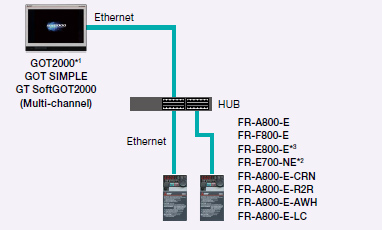
- *1The models with an Ethernet port are supported among GT21 models.
- *2The models with SERIAL “□88******” or later on the rating plate are supported.
- *3Line topology is also supported by FR-E800-E.
CASE 2
CC-Link IE Field Network connection via programmable controller
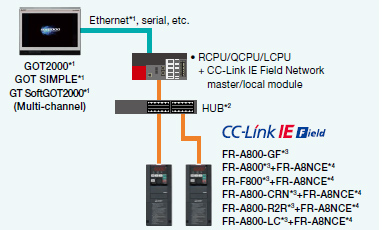
- *1GT21, GS21, and GT SoftGOT2000 support Ethernet connection only.
- *2In the CC-Link IE Field Network configuration, select a switching hub by referring to the relevant manual for the programmable controller used.
- *3The models with SERIAL “□83******” or later on the rating plate are supported.
- *4The FR-A8NCE with SERIAL “□83***” or later is supported.
CASE 3
CC-Link IE TSN connection via programmable controller
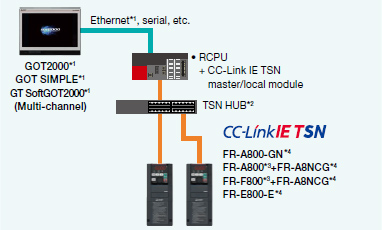
- *1GT21, GS21, and GT SoftGOT2000 support Ethernet connection only.
- *2In the CC-Link IE TSN configuration, select a switching hub by referring to the relevant manual for the programmable controller used.
- *3The models with SERIAL “□96******” or later (made in Japan) or “□97******” or later (made in China) on the rating plate are supported.
- *4Set the third octet of the inverter’s IP address to the network No., and set the fourth octet to the station number.
CASE 4
Ethernet connection via programmable controller
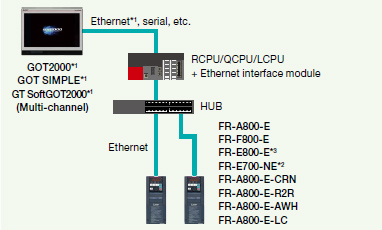
- *1GT21, GS21, and GT SoftGOT2000 support Ethernet connection only.
- *2The models with SERIAL “□88******” or later (for FR-E700-SC-NNE and FR-E700-SC-ENE, “□89******” or later) on the rating plate are supported.
- *3Line topology is also supported by FR-E800-E.
CASE 5
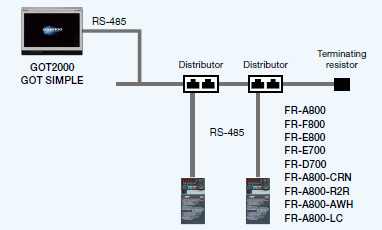
Direct connection with RS-485
| Related materials | ||
|---|---|---|
|
|
GOT2000 Drive Control (Inverter) Interactive Solutions < Contents > Challenges that cannot be resolved just with the inverter can now be resolved with GOT2000 and inverter interactive functions. See details of GOT2000 Drive Control (Inverter) Interactive Solutions |
Created :
Size :
(PDF)
|